Building the Scene
Once the modelling of each building was done I could then start to add them into my scene. To do this I would have to use Unity. Luckily, my teacher posted a video of how to create a scene in Unity and import the objects I had made in Maya into it. Once I had done that and successfully added them to Unity (with the textures attached to it – more difficult than it sounds) I could start to arrange them to look like an environment.
Firstly, before I added the objects into the scene I had to create the scene itself. I chose to use mountains and hills as the background of this scene in order to create an isolated atmosphere. This was to make it look like the environment was in the middle of nowhere, something I had to do to allow the scene to make sense (a sacrificial altar cannot be in the middle of a city). When the mountains had been added, raised/lowered and smoothed, I then had to add ground texture (grass, rock, mud etc.)
When the environment was made without the objects, and I was happy with the way it looked, I could then finally add my models and arrange the scene.
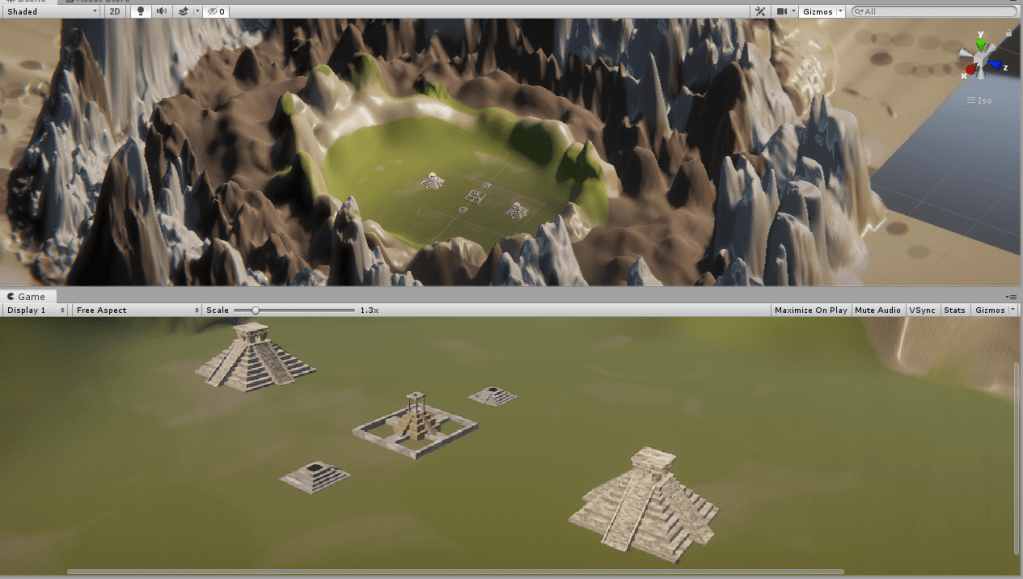
After creating an animation for the camera – making it move through the scene showing the objects in a personal way, I was finished with this project.
 Dan’s blog